Tuesday, February 26, 2019

AWS Lambda & Perl/Vendoring Libraries - A Case Study w/Image::Magick (Part II)

In my last blog, I showed how to create a zipfile that contains a working Image Magick Perl environment you can use when creating Perl Lambdas.

This is part two of a two part blog that discusses how to package libraries for your Perl Lambdas.
If you recall, in my last blog we created a Docker image and installed the Perl module Image::Magick  by downloading and compiling the latest Image Magick source code.  The trick it seemed was to make sure that the environment had no conflicting Image Magick include files.  We also used the --with-perl flag to install build PerlMagick rather than using cpanm to download install it from CPAN.

In order to make Image::Magick  work in the Lambda runtime environment, you'll need one more ingredient - the shared libraries specifically used by the Image Magick Perl module and possibly any shared libraries used by Image Magick shared libraries.

When Image Magick was built in our Docker image, the shared libraries were installed to /usr/local/lib.  To use Image Magick with Lambda you'll need these shared libraries installed, in the Lambda runtime environment but you won't be able to install them to /usr/local/lib.  Using Lambda Layers however you can install libraries to /opt/lib. In the Lambda execution environment LD_LIBRARY_PATH (one of the places where the dynaloader ld will look for shared libraries) points to /opt/lib.

From the Docker recipe in my previous blog, one of of the last steps is to copy the files created during the Image Magick build to /opt/lib.  I've copied all of the files from the build into /opt/lib however I believe that the Perl module only uses the libMagickCore-6.Q16.so.6.0.0.

RUN mkdir /opt/lib; \
    cp /usr/local/lib/libMagickCore-6.Q16.so.6.0.0 /opt/lib; \
    ln -s /opt/lib/libMagickCore-6.Q16.so.6.0.0 /opt/lib/libMagickCore-6.Q16.so; \
    ln -s /opt/lib/libMagickCore-6.Q16.so.6.0.0 /opt/lib/libMagickCore-6.Q16.so.6; \
    cp /usr/local/lib/libMagickWand-6.Q16.so.6.0.0 /opt/lib; \  
    ln -s /opt/lib/libMagickWand-6.Q16.so.6.0.0 /opt/lib/libMagickWand-6.Q16.so.6; \
    ln -s /opt/lib/libMagickWand-6.Q16.so.6.0.0 /opt/lib/libMagickWand-6.Q16.so; \
    cp /usr/local/lib/libMagick++-6.Q16.so.8.0.0 /opt/lib; \ 
    ln -s /opt/lib/libMagick++-6.Q16.so.8.0.0 /opt/lib/libMagick++-6.Q16.so.8; \
    ln -s /opt/lib/libMagick++-6.Q16.so.8.0.0 /opt/lib/libMagick++-6.Q16.so;

To see what shared libraries we need we use ldd. First, let's find the shared object that was built for the Perl module.

bash-4.2# locate Magick | grep perl
/opt/perl-5.28.1/lib/site_perl/5.28.1/x86_64-linux/Image/Magick
/opt/perl-5.28.1/lib/site_perl/5.28.1/x86_64-linux/Image/Magick.pm
/opt/perl-5.28.1/lib/site_perl/5.28.1/x86_64-linux/Image/Magick/Q16.pm
/opt/perl-5.28.1/lib/site_perl/5.28.1/x86_64-linux/auto/Image/Magick
/opt/perl-5.28.1/lib/site_perl/5.28.1/x86_64-linux/auto/Image/Magick/.packlist
/opt/perl-5.28.1/lib/site_perl/5.28.1/x86_64-linux/auto/Image/Magick/Q16
/opt/perl-5.28.1/lib/site_perl/5.28.1/x86_64-linux/auto/Image/Magick/Q16/Q16.so
/opt/perl-5.28.1/lib/site_perl/5.28.1/x86_64-linux/auto/Image/Magick/Q16/autosplit.ix
/usr/local/share/doc/ImageMagick-6/www/perl-magick.html

Next, let's see what shared libraries it requires.

bash-4.2# ldd /opt/perl-5.28.1/lib/site_perl/5.28.1/x86_64-linux/auto/Image/Magick/Q16/Q16.so
        linux-vdso.so.1 =>  (0x00007fffd1db8000)
        libMagickCore-6.Q16.so.6 => /tmp/ImageMagick-6.9.10-28/PerlMagick/quantum/../../magick/.libs/libMagickCore-6.Q16.so.6 (0x00007ff1d351b000)
        libm.so.6 => /lib64/libm.so.6 (0x00007ff1d3219000)
        libc.so.6 => /lib64/libc.so.6 (0x00007ff1d2e4c000)
        liblcms2.so.2 => /usr/lib64/liblcms2.so.2 (0x00007ff1d2bf4000)
        ...

This produces a rather lengthy list of shared librararies with libMagickCore-Q16.so.6 near the top.  In general, when building libraries to include in your Lambda Layers, you'll need to identify the shared libraries that do not exist in the standard Lambda runtime and copy those to the /opt/lib directory.  In this case, only the one shared library was not found on the standard runtime.  I've actually copied more of the Image Magick libraries that are built than is necessary for Image::Magick, to work in my Docker recipe, however there may be other utilities I may want to take advantage of in the future that require those, therefore it made sense to copy of all of them.

For example, if I want to use the version of the Image Magick convert utility that was built from source, I would copy that from /usr/local/bin.  Taking a look at that binary, we find it also requires libMagickCore-6.Q16.so.6 along with libMagickWand-6.Q16.so.6.

bash-4.2# /usr/local/bin/convert --version
Version: ImageMagick 6.9.10-28 Q16 x86_64 2019-02-24 https://imagemagick.org
Copyright: © 1999-2019 ImageMagick Studio LLC
License: https://imagemagick.org/script/license.php
Features: Cipher DPC OpenMP
Delegates (built-in): bzlib fontconfig freetype gslib jng jpeg lcms lzma png ps tiff x xml zlib
bash-4.2# ldd /usr/local/bin/convert | grep -i magick
        libMagickCore-6.Q16.so.6 => /usr/local/lib/libMagickCore-6.Q16.so.6 (0x00007f2075897000)
        libMagickWand-6.Q16.so.6 => /usr/local/lib/libMagickWand-6.Q16.so.6 (0x00007f207556d000)

Now with a Lambda Layer that contains Perl 5.28.1, Image::Magick and its shared libraries we're ready to proceed to the next task in creating our Lambda that interprets QR codes.  Next time - Building and Installing the zbar Library.  

Monday, February 25, 2019

AWS Lambda & Perl/Vendoring Libraries - A Case Study w/Image::Magick (Part I)

Now here's where things get interesting.

This is a two part blog that discusses how to package libraries for your Perl Lambdas.

So you'd like to use Image::Magick in your Perl Lambda? And you thought you would just use Image::Magick? Or perhaps you were smarter than that because you are using a Lambda Layer and have Perl 5.28.1 installed, so you thought might just install it via your Perl 5.28.1 Docker image that mimics the Lambda runtime environment using cpanm? Well, not so fast...

The first challenge is installing Image::Magick, the next challenge is actually running it in your Lambda.  Spoiler alert...both of these challenges are possible to overcome! In part 1 we'll install Image::Magick.


Sunday, February 24, 2019

AWS Lambda & Perl - Using Docker to Build Lambda Layers

As the Perl Lambda adventure continues, I'm learning more about the Perl toolchain, Lambdas and Docker.  After running into an issue with OpenSSL versioning on the supposed AMI that AWS documents as being the official Lambda execution environment it appears that it is not.

What does appear to be true is that the image is similar to the runtime environment. For a truer representation of the Lambda runtime there is a Docker image lambci/lambda that has proven to be a closer representation of the Lambda runtime environment.  In a previous post I noted that the version of OpenSSL on the AMI is 1.0.2 while the Lambda runtime environment version is 1.0.1.  The Docker image has OpenSSL version 1.0.1 installed, so empirically the Docker image does appear to be similar to the Lambda execution environment.  Why is this important?

Thursday, February 21, 2019

AWS Lambda & Perl - The Journey Begins

Perl has been the odd man out as more modern programming languages take hold and gain the support of the software development community.  There is no doubt that Perl 5 has been left in the dust with regard to support from vendors of all kinds.  It is rare to see an API written for Perl for any of the cloud services.  It seems to be left up to the Perl community itself to provide support for many of these APIs.

A few weeks ago I released version 0.0.1 of a framework for creating AWS Lambdas in Perl.   It is a challenge to continue to develop in Perl and becomes more and more challenging as other languages continue to gain support, however I don't think the Perl community is giving up.  While I'm quite willing to learn Python and embrace new methods, I also see the need for supporting legacy environments with a large investment in Perl code.  I also enjoy a challenge. :-)

Tuesday, February 19, 2019

AWS Lambda Gotchas - libcrypt.so.10 Hell and Back

This is part of continuing series of blog posts regarding AWS Lambda and Perl.

As I continue my deep dive into making Perl work effectively as a Lambda runtime, I hit the libcrypto wall that so many other people on the wire have encountered...even Pythonistas!

Sunday, February 17, 2019

CodeBuild 2019 or "How I built perl for less than 3 cents"

This is my second (or third) dalliance with AWS CodeBuild.  I think I'm starting to like it now though.  I recently wrote a bash script to compile a version of perl to create Lambdas as part of my Perl Lambda project.  My so-called `make-a-perl` script will instantiate an EC2, download the perl source code, compile it, zip it up and copy it to an S3 bucket.

I suspected I could use AWS CodeBuild to do all of the aforementioned operations, but did not want to descend down the CodeBuild rabbit hole once more.  But alas, the temptation was just too much!

Sunday, June 10, 2018

RPM Virtual Packages and Ordering

I recently decided to use an RPM virtual package (one that offers no files but merely Requires others) in order to lock down the version of packages that were being installed when an EC2 was provisioned.  Much to my chagrin it failed miserably when yum loaded packages in an unexpected order.  So, can you tell yum what order to load your RPMs?

Wednesday, June 28, 2017

Binding parameters for Oracle INTERVAL Literals

If you've ever tried to use the Perl DBI to execute a SQL statement like this:

select sysdate + interval '1' month from dual

...and wanted to make the interval a parameter, you may have tried various permutations, gotten frustrated and just injected a string into the query.  There is a solution...

Tuesday, March 14, 2017

AWS CodeBuild - HowTo

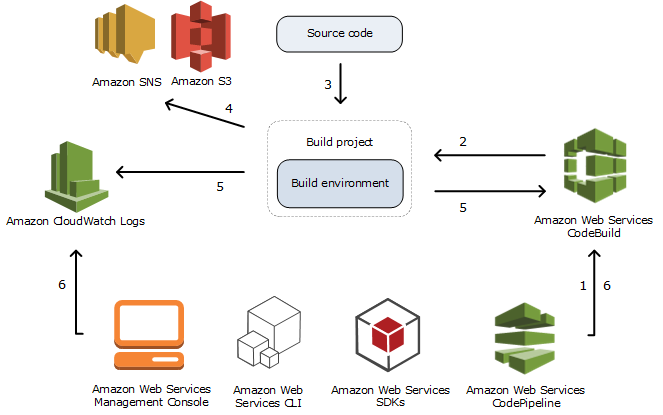
Amazon Web Services' CodeBuild is a managed service that allows developers to build projects from source.

Typically CodeBuild is used as part of your CI/CD pipeline, perhaps along with other AWS tools like CodeCommit, CodePipeline and CodeDeploy.

This blog will explore the use of CodeBuild to build the Bedrock project and update a yum repository.  Along the way I'll detail some of the things I've learned and the path I took to automating the Bedrock build.

Sunday, March 12, 2017

AWS CodeBuild and why I have no hair left

I'll blog soon about AWS CodeBuild and CodePipeline when I get around to documenting all of my frustrations but for now,  to save some poor souls from losing their hair, here are some quick tips:


  1. CodeBuild is not very helpful regarding malformed YAML in your buildspec.yml file.  If things don't work, check to make sure your buildspec.yml file is well formed.
  2. As if that were not bad enough, even if it is well formed, if you include elements it does not recognize it might just skip them silently.  I inadvertently used pre-build instead of pre_build and lost some hair on that one.
  3. As verified in this blog post, CodeBuild will not upload artifacts to the root of a bucket - it really wants a folder name.  Odd really, since S3 objects have key names and folders do not really exist.  I was trying to create a yum repository in a bucket that is hosting a website and wanted my files to in the root of the bucket.  No can do pal.
  4. If you want to sync some files to said website bucket and are making the site publicly available by setting permissions as I was using the CLI, you'll need to make sure that your CodeBuild policy that is attached to the role you use to run CodeBuilder has the proper permissions to your S3 bucket.  In this case you'll need ListObject, PutObject, GetObject, and PutObjectAcl.   Here's what the policy might look like:
{
    "Version": "2012-10-17",
    "Statement": [
        {
            "Effect": "Allow",
            "Resource": [
                "arn:aws:logs:us-east-1:*********:log-group:/aws/codebuild/bedrock-build",
                "arn:aws:logs:us-east-1:*********:log-group:/aws/codebuild/bedrock-build:*"
            ],
            "Action": [
                "logs:CreateLogGroup",
                "logs:CreateLogStream",
                "logs:PutLogEvents"
            ]
        },
        {
            "Effect": "Allow",
            "Resource": [
                "arn:aws:s3:::codepipeline-us-east-1-*"
            ],
            "Action": [
                "s3:PutObject",
                "s3:GetObject",
                "s3:GetObjectVersion"
            ]
        },
        {
            "Effect": "Allow",
            "Resource": [
                "arn:aws:s3:::openbedrock",
                "arn:aws:s3:::openbedrock/*",
                "arn:aws:s3:::repo.openbedrock.net",
                "arn:aws:s3:::repo.openbedrock.net/*"
            ],
            "Action": [
                "s3:Put*",
                "s3:Get*",
                "s3:List*"
            ]
        }
    ]
}

More about my adventures with CodeBuild and CodePipeline later...

Friday, December 30, 2016

Follow-up: Using AWS Simple Email Service (SES) for Inbound Mail

As I alluded to in my first post on this subject, it's possible to use AWS Lambda to process mail you receive as well.   In this final post on AWS Simple Email Service, I'll show you how to forward your email using a Lambda function.

Thursday, December 29, 2016

Part 2: Using AWS Simple Email Service (SES) for Inbound Mail


Delete, delete, delete, delete, forward...

In part one of my two part blog on Amazon's Simple Email Service, we set up the necessary resources to receive and process inbound email. In part two, we'll  create a worker that reads an SQS queue and forwards the mail to another email address.

Sunday, December 18, 2016

Using AWS Simple Email Service (SES) for Inbound Mail

Oy! Good thing no one else can see THIS message!
We all know what a pain in the rump it is to setup, manage, and secure an inbound mail server.  It's a thankless job that is increasingly the point of attack for bad guys.  It's also possible that if you screw it up you might find yourself in front of Congress!

In our architectures, now more than ever, it is important to reduce the surface area for attacks. That means closing down as many access points to your network as possible.  SMTP running on port 25 is a gaping hole that most architects interested in securing their networks want turned off, like yesterday!

If you don't want to completely outsource your inbound mail to a managed service, AWS SES inbound email service is one way to have your cake and eat it too.   It's especially useful if you want to allow your application to receive mail but you don't necessarily want or need to host an email service that includes an IMAP or POP server.  You may only need to receive mail in which case AWS SES is the perfect solution.  Along with a scalable managed service, SES also includes spam filtering capabilities.

In this two part blog, we'll explore setting up a simple inbound mail handler for openbedrock.net using Amazon Web Services Simple Email Service (SES).

Saturday, December 17, 2016

Using AWS S3 as a Yum Repository

In an earlier post I described how you can use an S3 bucket to host a yum repository.  In this post we'll give the repository a friendlier name and create an index page that's a tad more helpful.  If you're not using AWS S3 and CloudFront to host your static assets, you might want to consider looking into this simple to use solution for running a website without having to manage a webserver.

Visit http://repo.openbedrock.net to see the final product.

Monday, December 5, 2016

AWS re:Invent - Wrap Up

It's Friday, I'm blogging at 33,000 feet and the captain has just turned off the seat belt signs, informed us that it's 50 degrees back at our final destination, Philadelphia, Pennsylvania and directed us to just sit back and relax.  I get very nervous when the captain of a plane flying at 33,000 feet tells me my final destination is Philadelphia.  I'm hoping to do a few more trips to AWS re:Invent before my "final destination" arrives.

CloudBlogging (pun intended) about my 5 days at one of the most important cloud computing events each year thanks to my Acer Chromebook and my free GoGo Inflight passes.  I still have 6 left of the 12 I received when I purchased the C720 nearly three years ago prior to attending my second AWS re:Invent extravaganza. Wifi at 33,000 feet is spotty but it is possible to complete a blog post on a 5 hour trip across the country.

No blog here would be complete without a shameless plug (I promise this is the only plug in the blog) for Chromebooks - #LoveMeSomeChromebook.

If you haven't read the rest of this somewhat tantalizing series on AWS re:Invent start here.  I'll wrap up the blog series with a recap of the week's highlights, opine a bit and provide you with some of the key takeaways.  Enjoy!

Friday, December 2, 2016

AWS re:Invent Day 5

Werner Vogels does his Superman impression

Werner Vogels - Keynote

Lots of announcements from the AWS CTO. Some user stories (Twilio, Netflix, Mapbox, TrainLine), lots of focus on developer tools and big data management tools.

Some highlights:


AWS Glue - ETL pipeline tool
AWS Batch - Ummm, batch processing.
Lambda@Edge - Lambda on CDNs to move processing away from your server with faster results.

Read more about the announcements here.

...on to my agenda for the day.

Thursday, December 1, 2016

AWS re:Invent Day 4

Poolside lunch at Mirage
Yet another incredibly long day - breakfast @7:00am, keynote by Andy Jassy, a breakout at 11:00am at the Venetian, a very fast pit stop to try to shovel some lunch before another 1:00pm breakout session at the Mirage, followed by sessions until 6:30pm.  Pub Crawl with 30,000 other re:Invent thirsty geeks to 7:30pm.

Wednesday, November 30, 2016

AWS re:Invent Day 3

How do you feed 30,000 people?  Hangar 1
Intense day 3!
  • 5 breakout sessions.
  • Breakfast at 7:30am, first session 10:00, last session ends at 6:00pm.
  • Reception in the vendor hall from 6-7pm (lot's of tee shirts and goodies!)


Read on for some session recaps...

AWS re:Invent Day 2

Monday, November 28th is bootcamp day.  Attended an AWS Solutions Architect Associate prep course given by some Amazon employees.  Excellent overview of what to expect in the Associates exam with pointers on how to interpret the questions and what you should be focusing on.

Yeah, but where's the holodeck?
The bootcamp was 4 hours (8am-12pm) at the Wynne Encore.   After taking the bootcamp I feel confident in passing the test, but am reminded of how many services AWS encompasses and how deep the information for each service is.  I'll study some  more.  ;-)

A lot of this is also a moving target as the certification test questions are not keeping up with the announcements being made regarding increasing capacity, capabilities and decreasing prices.

AWS re:Invent Day 1

Here we are at the Amazon annual re:Invent for another year of mind blowing technological advancement in cloud computing.  This is my fourth year attending and so far I can tell this is going to be filled with exciting technology, even more walking than 2015 (argh!) and even more standing patiently in line.

Over 30,000 people are registered so it's grown beyond the ability of the Venetian to hold the event.  This year there are events at the Mirage and the Wynne hotels in additon to the Venetian, making the logistics of schedule making a real challenge for both attendees and the conference coordinators.

Arrived on Sunday and picked up my SWAG...yet another hoody...and a surprise.  An Echo Dot sponsored by Capital One!

I'll be posting some notes about each day...